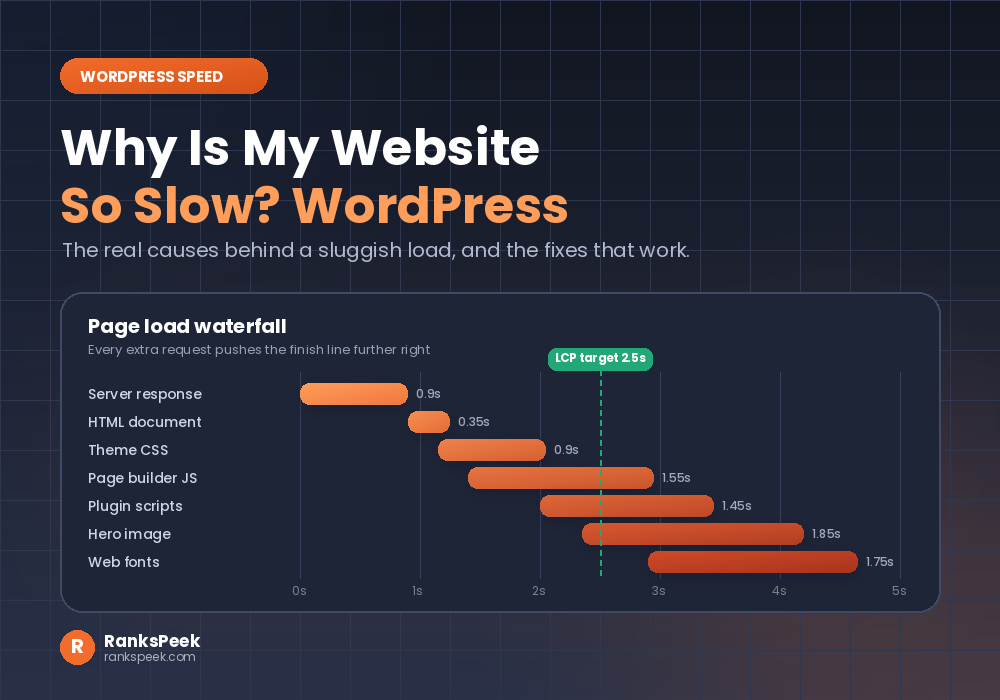
Why is my website so slow WordPress is the question you type at midnight, right after a visitor complains. Your dashboard feels fine. Meanwhile your homepage does not. So you sit there watching the spinner, wondering what changed. In fact millions of WordPress owners ask why is my website so slow WordPress every single day, and the answer is almost always the same short list.
Here is the good news. In truth these speed problems are rarely mysterious. Instead they stack up quietly. So once you unstack them in the right order, most WordPress sites get noticeably faster within a single afternoon.
Quick answer: Why is my website so slow WordPress? Usually because of four things working together: an overloaded shared server, too many plugins running their own code, oversized images, and missing or broken caching. Test your server response first, then fix the heaviest layer, not the easiest one.
- The short answer
- Measure before you guess
- Where your load time actually goes
- Hosting sets the ceiling
- Plugins and themes add weight
- Images are usually the heaviest part
- Caching, and why it sometimes backfires
- Distance, CDN and a bloated database
- Core Web Vitals thresholds
- The SEO cost of a slow site
- A cache lesson from our own site
- The fix checklist
- Speed, AI Overviews and 2026
- Frequently asked questions
Why Is My Website So Slow WordPress: The Short Answer
WordPress builds most pages on demand. In other words, every time someone clicks, the server runs PHP, asks the database for content, assembles the HTML, and only then sends anything back. Meanwhile the browser downloads your theme files, your plugin scripts, and your images.
So the answer to why is my website so slow WordPress is almost never one villain. Instead, four culprits usually share the blame:
- Hosting. Above all, a cheap shared plan caps how fast anything can happen.
- Plugins and themes. Similarly, every active plugin adds code that runs on each request.
- Images. For example, one camera photo can outweigh your whole theme.
- Caching. Meanwhile, without it the server rebuilds the same page for every visitor.
Therefore, fix those four in order and you solve most cases. However, you still need proof before you start, because guessing wastes a weekend.
Why Is My Website So Slow WordPress: Measure Before You Guess
First, get numbers. Otherwise you will delete a harmless plugin and celebrate a change that never happened.
To begin with, run your homepage and one blog post through our free PageSpeed Insights tool. Above all, look at two numbers. Firstly, server response time tells you how long the host took to send the first byte. Secondly, Largest Contentful Paint tells you when the main content appeared. Then repeat the test on mobile, because mobile is where most sites fall apart.
After that, note your server location with the IP Domain Location tool. If your audience sits in one country and your server sits on another continent, distance alone adds delay. Finally, run a broader crawl check with our SEO Checker so you can see speed problems and on page problems together.
Where Your Load Time Actually Goes
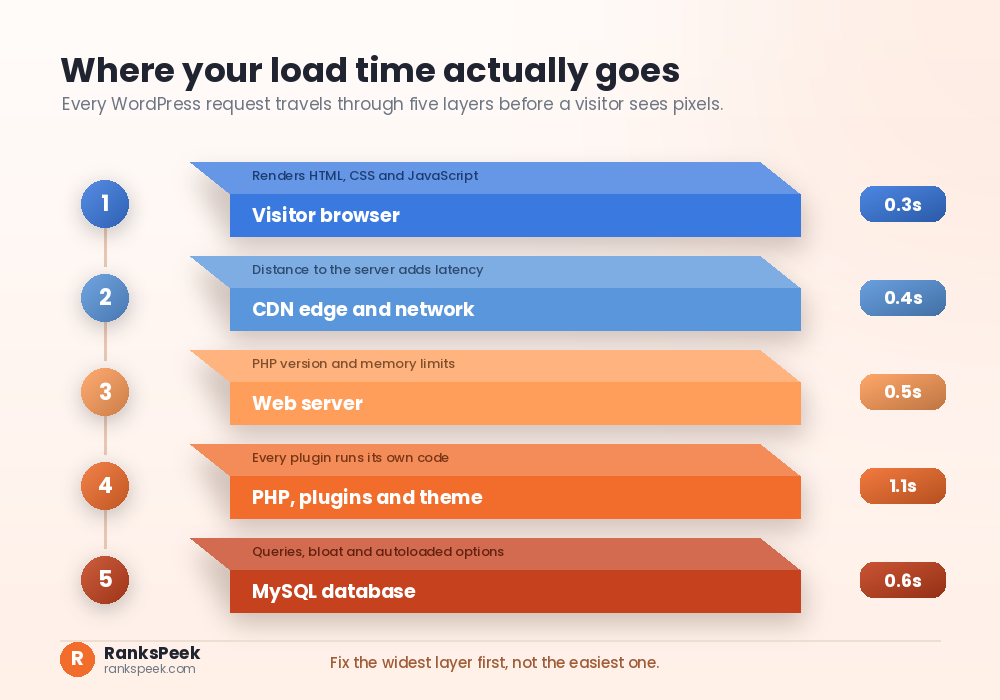
Anyone asking why is my website so slow WordPress should start right here. To clarify, every request passes through five layers. Because each layer adds milliseconds, a small delay in one place multiplies across the page.
- The browser firstly renders HTML, CSS and JavaScript.
- The network then carries data between visitor and server.
- The web server subsequently accepts the request and runs PHP.
- PHP, plugins and the theme also execute your site logic.
- The database finally answers queries for posts, options and settings.
Notably, only two of these layers live inside WordPress. That is why plugin tweaks alone often disappoint. So start with the widest layer, which is usually the server.
Why Is My Website So Slow WordPress? Hosting Sets the Ceiling
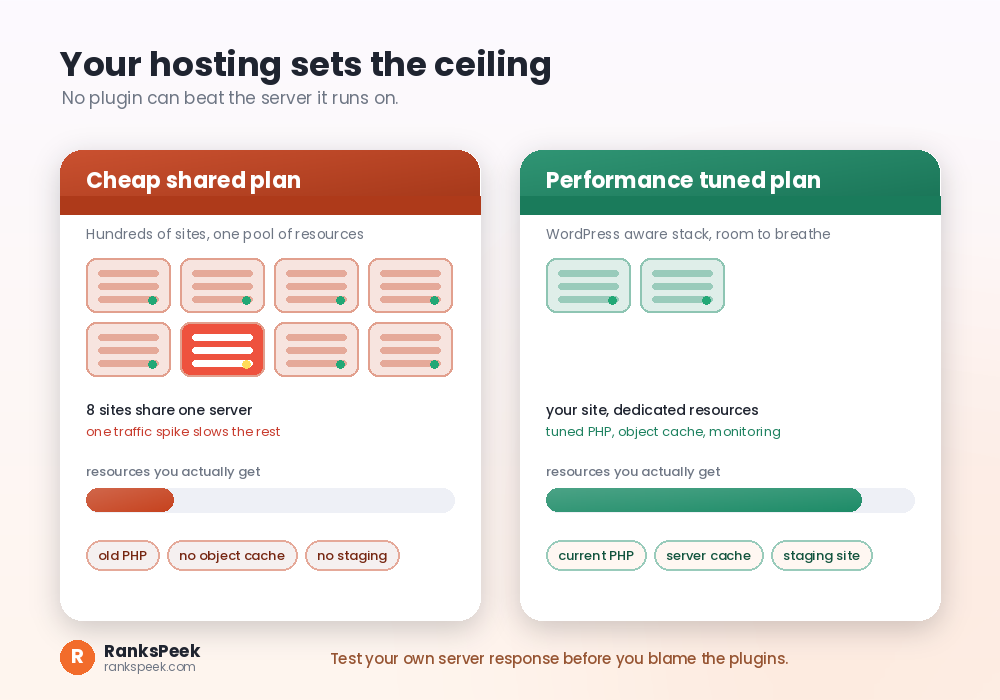
On a budget shared plan, hundreds of sites share one machine. So when a neighbour gets a traffic spike, everyone else waits. In addition, these plans often ship with older PHP versions, tight memory limits, and no server level caching.
Here is the simple test. Ask why is my website so slow WordPress, then load a page and watch the server response time in our speed tool. If that number is high before a single image downloads, your problem is not the gallery plugin. Rather, it is the server itself.
Consequently, look for a plan that offers a current PHP version, generous memory, server side caching, and a staging environment. Also check whether the host keeps a data centre near your main audience. Good hosting will not fix a bloated theme, of course. Still, it raises the ceiling so every other fix actually shows up.
Plugins and Themes Add Weight
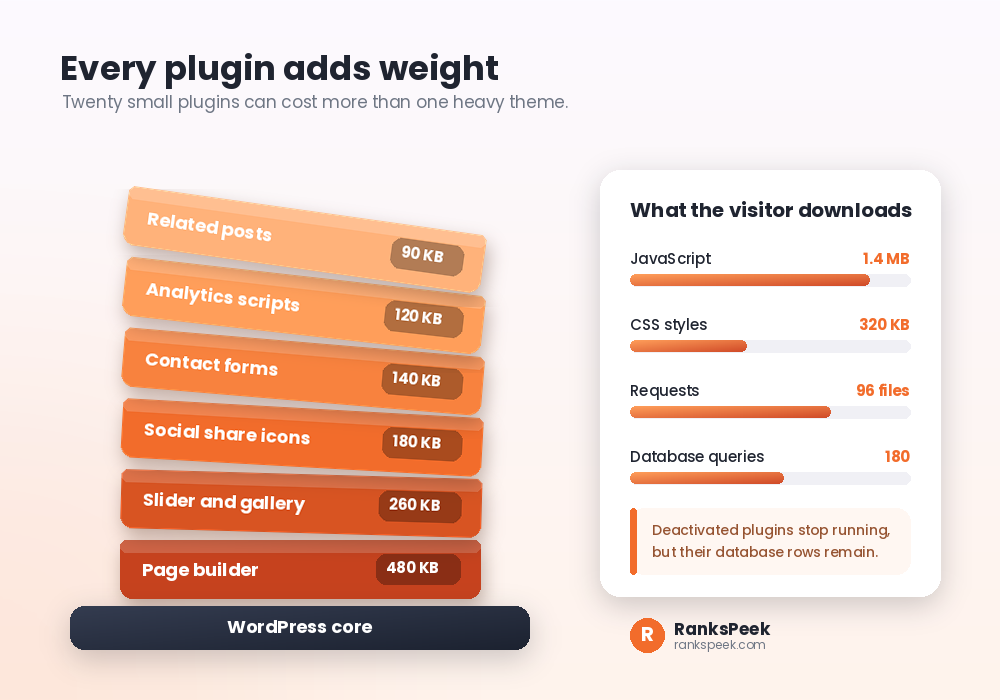
Plugins are not evil. Yet weight is. Twenty small plugins can easily cost more than one heavy page builder, since each one may load its own CSS and JavaScript on every page.
To begin with, work through this order:
- Audit. Firstly, list every active plugin, then ask what each one earns.
- Remove. Secondly, delete anything unused. Deactivated plugins stop running, yet their database rows stay behind, so delete rather than deactivate.
- Replace. Then swap one bloated plugin for a lighter option that does the same job.
- Limit. Finally, load heavy scripts only where they belong. A contact form script rarely needs to run on your blog archive.
Themes deserve the same audit. Likewise, feature rich builders generate extra markup and extra requests. If your theme ships a slider, a font pack, and an icon library you never use, that weight travels to every visitor anyway.
Why Is My Website So Slow WordPress? Images Are Usually the Answer
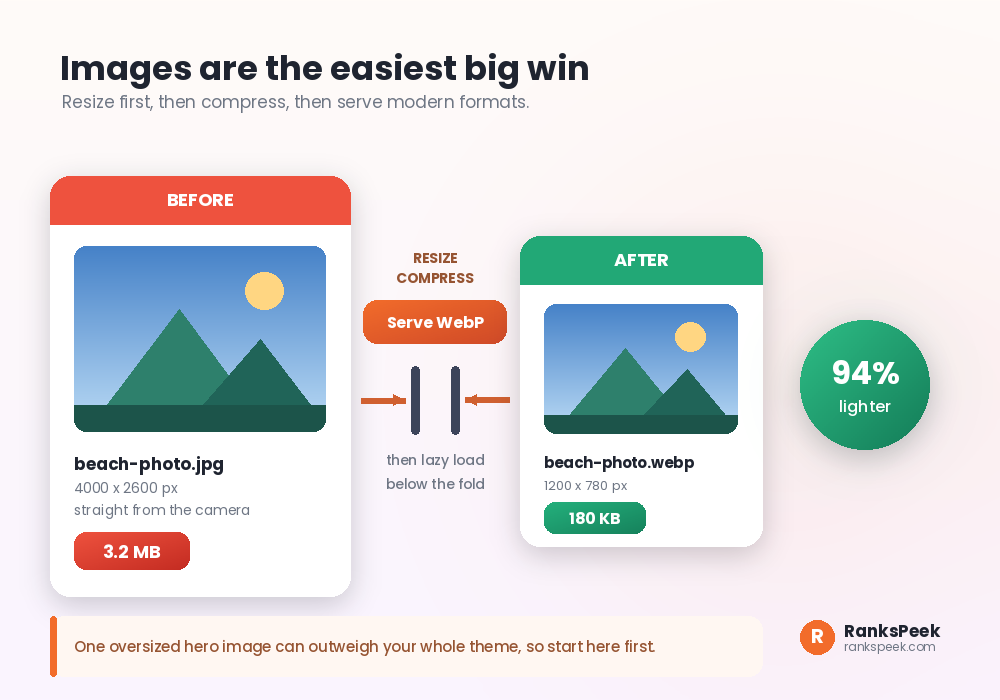
Most slow pages hide one oversized image. For instance, a phone photo can arrive at four thousand pixels wide, while your layout displays it at eight hundred. The browser still downloads every wasted pixel.
Therefore fix images in three steps:
- Resize first. To clarify, match the largest size your layout ever displays.
- Compress next. Usually the quality drop stays invisible, while the file size drop is dramatic.
- Serve modern formats. In most cases, WebP files are far smaller than the equivalent JPEG.
After that, enable lazy loading for images below the fold. Also give your hero image explicit width and height attributes. As a result, the browser reserves space and your layout stops jumping while the page loads.
Caching, and Why It Sometimes Backfires
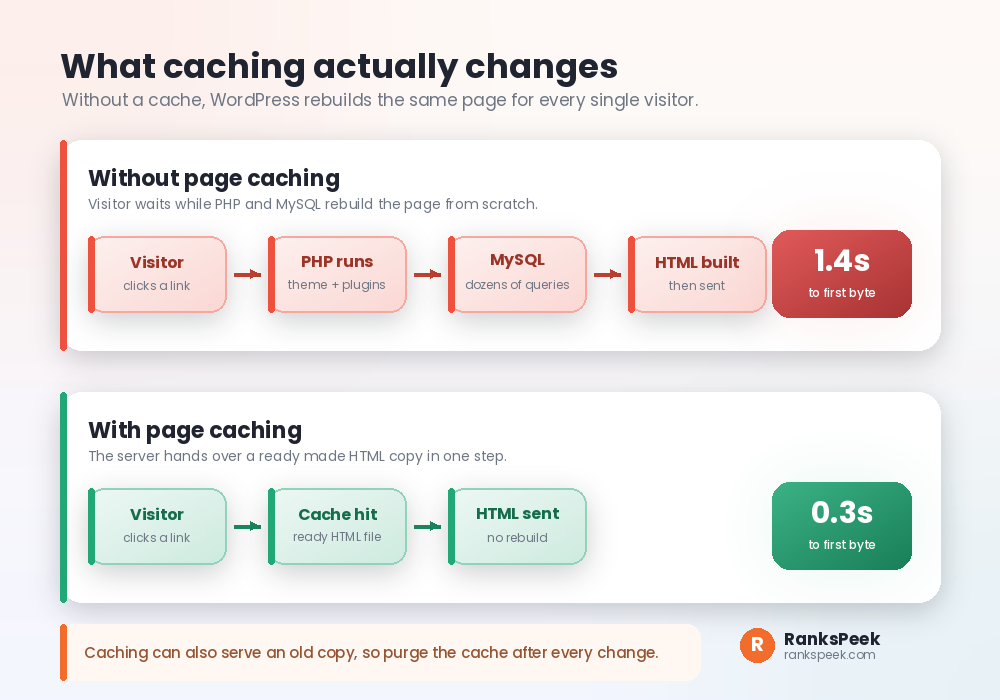
Caching saves a finished copy of your page. So when the next visitor arrives, the server hands over that copy instead of rebuilding everything. Because the PHP and database work disappears, the page starts arriving almost immediately.
Useful layers include page caching for full HTML, object caching for repeated database queries, and browser caching for static files. Furthermore, many hosts provide these at server level, which usually beats a plugin.
Many people ask why is my website so slow WordPress right after a redesign. Often the cache is simply serving yesterday. However, caching has a dark side. A cache can keep serving an old copy long after you change something. That single quirk causes some of the strangest problems in WordPress, and we hit one ourselves. More on that below.
Distance, CDN and a Bloated Database
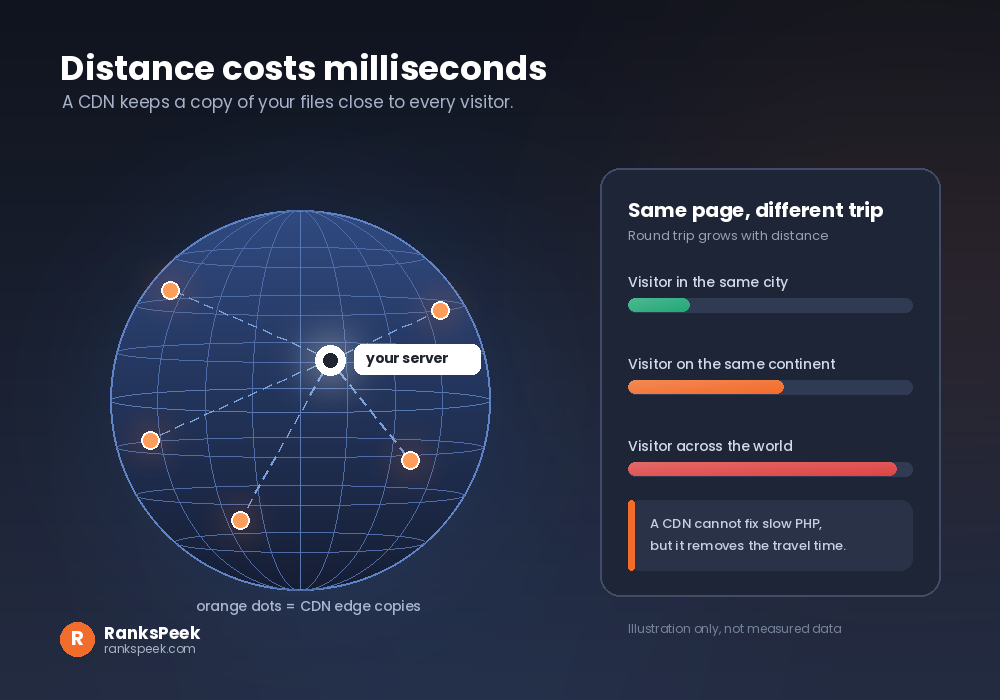
Data travels at a finite speed. So if your server sits in Europe while your readers sit in Asia, every file makes a long round trip. A content delivery network fixes this by keeping copies of your static files near visitors. Consequently, images and scripts arrive faster, and your origin server handles less work.
Databases quietly bloat too. Firstly, post revisions pile up. Secondly, old plugin tables stay after uninstall. Autoloaded options grow until every page load carries them. So clean revisions occasionally, remove orphaned tables carefully, and always back up before you touch the database.
Core Web Vitals: The Numbers Google Publishes
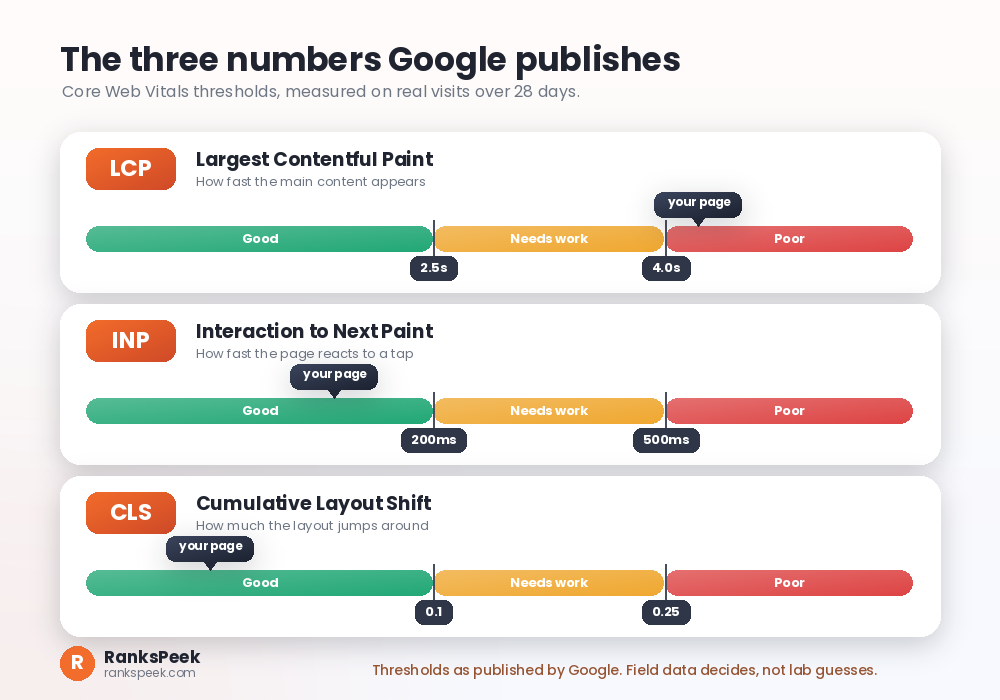
Google publishes clear thresholds, so you do not have to guess what counts as fast. Notably, these come from real visits, not from your laptop.
| Metric | What it measures | Good | Poor |
|---|---|---|---|
| LCP | When the main content appears | 2.5 seconds or less | Over 4 seconds |
| INP | How quickly the page responds to a tap | 200 ms or less | Over 500 ms |
| CLS | How much the layout shifts | 0.1 or less | Over 0.25 |
Lab tools estimate these numbers. Meanwhile, field data from real visitors confirms them. If the two disagree, trust the field data and keep testing on mobile.
Why Is My Website So Slow WordPress: The SEO Cost
Speed is not a magic ranking button. Indeed Google has stayed consistent about this. Above all, helpful and relevant content still wins, and a fast page about nothing ranks nowhere. Even so, why is my website so slow WordPress matters for search in three practical ways.
Crawling. Firstly, a slow server can limit how much Googlebot fetches in a session. As a result, fewer fetches mean slower discovery for new posts. If pages already struggle to appear, our guide on why your website is not showing up on Google pairs well with this one.
Page experience. Secondly, Core Web Vitals form part of Google’s page experience signals. So when two pages are similarly helpful, experience can act as a tiebreaker.
Behaviour. Thirdly, visitors leave slow pages. Naturally, they do not read, share, or link. Over time that costs you the very signals that take months to build, as we explain in how long SEO takes to see results.
A Cache Lesson From Our Own Site
We learned this the hard way on RanksPeek. Our blog pages appeared in Search Console as excluded by a noindex tag. Yet every setting looked correct. Firstly we checked the post settings, then the SEO plugin, and finally the site wide visibility option. Surprisingly, all of them looked fine.
Eventually we found the culprit. The cache plugin kept serving an older version of those pages, complete with the old noindex tag. Therefore our fix took three steps. Firstly, we purged the cache completely. Secondly, we resubmitted the correct sitemap. Thirdly, we requested indexing. Shortly after, the next article appeared in Google within a day.
Later we hit a second cache flavoured surprise on a tool page. Search Console reported a duplicate with a different canonical chosen by Google. To clarify, the internal links, the sitemap entry, and the canonical tag all disagreed with each other. Once all three pointed at the same address, the warning cleared. If canonicals confuse you, start with our explainer on what a canonical URL is in SEO.
The lesson is simple. So when WordPress behaves impossibly, suspect the cache before you suspect yourself.
Why Is My Website So Slow WordPress: The Fix Checklist
Work top to bottom. Test after each step, since one change often hides another.
- Test first. Firstly, run the homepage and one post on mobile, so you have a baseline instead of a feeling.
- Read the server response. Secondly, check that number, because it separates hosting problems from page problems.
- Update PHP. Then move to a current version, since newer PHP runs the same code faster.
- Enable page caching. After that, WordPress stops rebuilding the page for every visitor.
- Fix images. Next, resize, compress and convert them, because they are usually the heaviest downloads.
- Delete unused plugins. Consequently, less code runs on every single request.
- Trim the theme. Similarly, a lighter theme means fewer files and fewer requests.
- Add a CDN. Meanwhile, distant visitors get a much shorter trip.
- Clean the database. Also remove old revisions and orphaned tables, but back up first.
- Purge and retest. Finally, clear the cache, retest, and record the result, so you can prove the win.
Meanwhile, broken links waste crawl budget while you optimise, so fix those too. Our guide on 404 errors and how to fix them covers that cleanup in detail.
Speed, AI Overviews and 2026
In 2026 the question why is my website so slow WordPress also touches AI visibility. Search results now include AI Overviews and other generated summaries. These features draw on pages that search engines can crawl, render and understand. Therefore a page that times out is a page that cannot be cited, no matter how good the advice inside it is.
Assistants and AI crawlers behave a little like impatient readers. Firstly they arrive, then they request, and soon they move on. So the fundamentals matter more than ever in 2026. Clean HTML helps. Similarly, fast server responses help. Stable layouts help too. None of this is a new trick, which is rather the point. For the wider picture, read our take on whether SEO is dead or evolving in 2026 and our roundup of the latest SEO trends.
Frequently Asked Questions
Why is my website so slow WordPress even after installing a cache plugin?
Because a cache plugin only skips the rebuild step. So if your server response is slow, or your images weigh megabytes, the visitor still waits. Firstly check server response, then image weight, and only then blame the plugin.
Why is my website so slow WordPress on mobile but fine on my laptop?
Mobile devices have less processing power and slower connections. For example, heavy JavaScript that feels instant on a desktop can take seconds on a mid range phone. Therefore always judge your site by the mobile numbers.
Does site speed change my Google rankings?
Speed is one part of page experience, and page experience is one of many signals. Above all, relevance and helpfulness matter more. Still, speed influences crawling and visitor behaviour, so it supports rankings indirectly.
How fast should a WordPress page load?
Aim for Largest Contentful Paint at 2.5 seconds or less on real mobile visits. Still, treat that as the target rather than the finish line.
Do I have to change hosting to get faster?
Not always. Firstly try caching, image optimisation and a plugin audit. If server response stays high after all that, hosting is the ceiling, and therefore a move is the honest answer.
How often should I test my speed?
Test monthly, and also after every theme change, plugin install or major update. Unfortunately small regressions creep in quietly, so a quick monthly check saves painful surprises.
Final Thoughts
So the next time you ask why is my website so slow WordPress, reach for a measurement, not another plugin. In short, slow WordPress sites are rarely broken. Rather, they simply carry too much. Firstly measure, then fix the heaviest layer, and finally retest after every change. Above all, resist the temptation to install another plugin to fix a plugin problem. Start with our free PageSpeed Insights tool today, note your numbers, and work down the checklist. Your visitors will notice long before Google does.