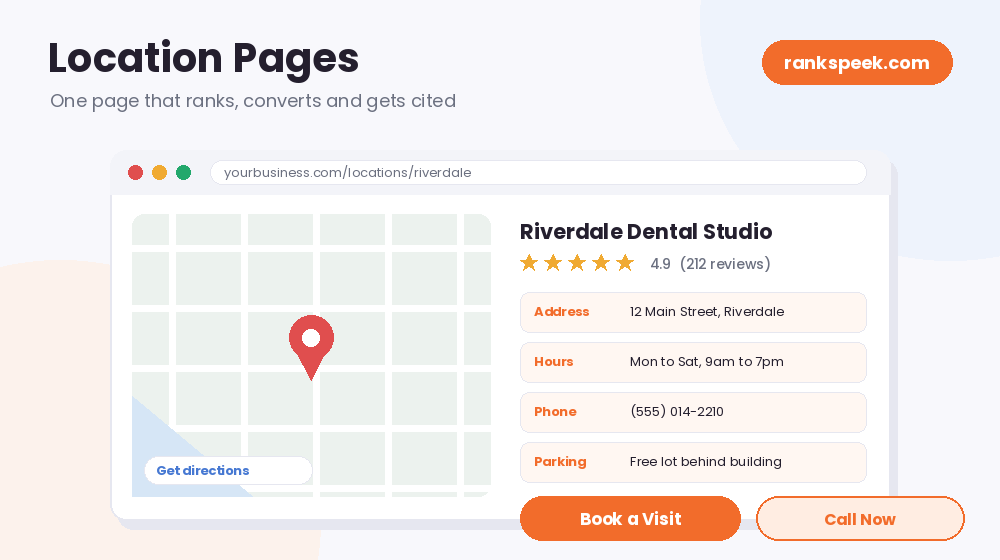
Well-built location pages are one of the most underrated assets in local SEO. However, most of them fail for one of two reasons: they are either too thin, showing just an address and a phone number, or too generic, using the same template with only the city name swapped. Google sees through both, and so do AI search tools. When you build location pages properly, one page can rank in search, support your Google Business Profile, get cited in AI answers, and convert visitors into calls. In this guide, you will learn the two types of location pages, what to put on them, and how to make yours stand out with free tools.
Location pages are dedicated pages on a business website that target a specific city, town, or area. There are two types: physical location pages for places customers visit (with address, hours, and directions), and service area pages for regions a business serves without an office there. Because they match local searches like “dentist in Riverdale”, well-made location pages rank in Google, appear in AI answers, and turn local searchers into customers.
What Are Location Pages?
Location pages are pages built to win searches that include a place, such as “plumber in Milton” or “dental clinic near Riverdale”. Instead of one generic services page, you create a focused page for each important city or area. As a result, searchers land on a page that speaks directly to their town, their questions, and their situation. Google rewards that relevance, and so do customers, because a page about their area feels far more trustworthy than a generic one.
The Two Types of Location Pages
Before building anything, you need to know which type fits your business, because the two serve very different search intents:
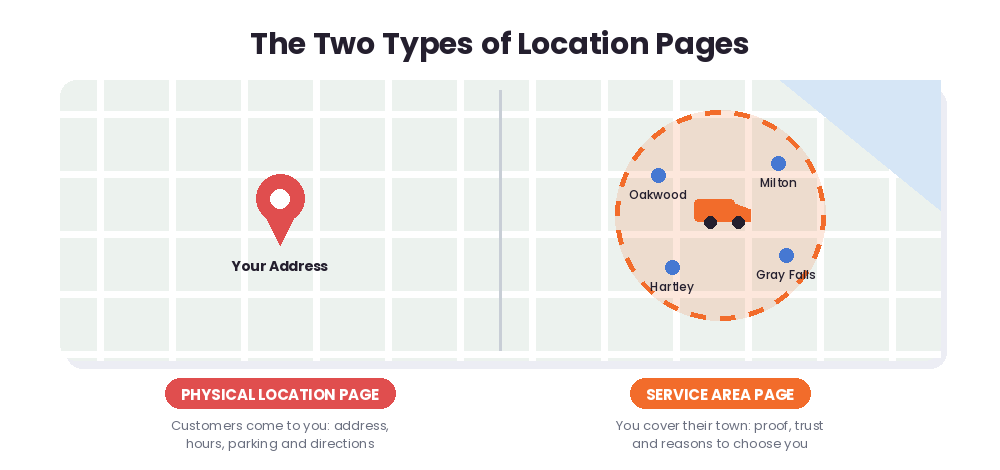
- Physical location pages. Use these when customers come to you, for example a shop, clinic, office, or restaurant. Searchers here want logistics: the address, hours, parking, directions, and what to expect when they arrive.
- Service area pages. Use these when you serve a town without having an address there, for example a plumber, electrician, or cleaner who travels to customers. Searchers here want proof that you really cover their area, plus reasons to choose you.
Many businesses need both. In that case, link them together sensibly: each service area page should point to your nearest physical location, and each physical page should list the areas it covers. That way, both users and search engines understand your structure clearly.
Why Most Location Pages Fail
Two mistakes kill most location pages. First, thin content: a page with only a name, address, and phone number gives Google nothing to rank and gives visitors no reason to stay. Second, city-name swapping: fifty identical pages where only the town name changes. Google treats those as duplicate content, and consequently the whole batch underperforms. Worse, thin duplicated pages can drag down trust in your entire site, not just those pages. So if you cannot write something genuinely useful about an area, it is better to build fewer, stronger pages.
What to Put on a Location Page
The best location pages follow a clear structure. Here is the anatomy that works:
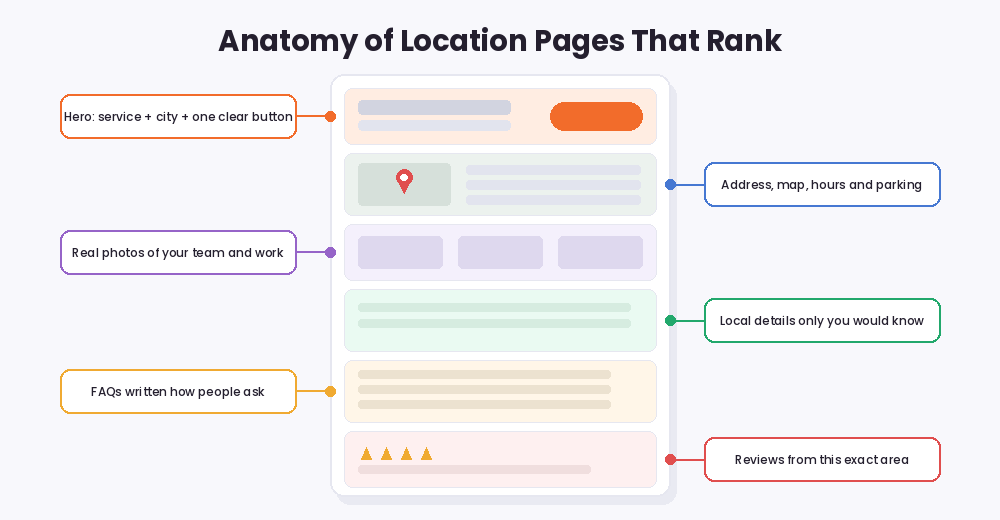
- A clear hero. Service plus city in the heading, and then one obvious button, such as Call Now or Book a Visit.
- Address, map, and hours for physical pages, or coverage details for service areas.
- Real photos. Your actual team, shop, or completed local work. Stock photos quietly destroy trust.
- Local proof. Details and examples from that specific area, which we cover next.
- FAQs. Written exactly the way people ask, because both Google and AI tools love clear question-and-answer sections.
- Local reviews. Testimonials from customers in that exact area beat generic praise every time.
Add Real Local Value
This is the part most businesses skip, yet it is exactly what separates winners. Real local value means writing things only someone who works in that area would know. For example, a roofer can mention the hailstorms that hit a region every spring, and a painter can address the rules for older historic houses in a specific neighborhood. Similarly, an HVAC company can explain how local weather affects system choices. These details cannot be copy-pasted between cities, and that is precisely why they rank. Also, match the depth to the decision: a big renovation page deserves long, detailed content, while a laundromat page can stay short and practical.
Location Pages and AI Search in 2026
In 2026, local searches increasingly end in AI answers, so structure matters more than ever. AI systems favor pages they can parse quickly: clear headings, scannable lists, comparison-style details, and FAQ sections with direct answers. Additionally, structured data (LocalBusiness and FAQ schema) helps machines read your facts correctly; Google’s Search Central documentation explains the markup. Beyond your own site, a complete Google Business Profile and mentions in local roundups make AI tools far more likely to recommend you. In short, the same clarity that helps human visitors is now what earns AI citations too.
Free Tools to Build Better Location Pages
You can build and improve location pages without paid software. Here is a simple workflow using our free tools:
- Find local phrases first. Use the Keyword Generator to discover “[service] in [city]” terms, and then dig deeper with the Long Tail Keyword tool for the specific questions locals ask.
- Audit every page. Run each one through the SEO Checker so no page ships with missing basics.
- Perfect the titles. Because every page targets a different area, check each title and description with the Meta Tags Analyzer.
- Keep pages fast. Local searchers are often on phones, so test speed with PageSpeed Insights.
- Confirm Google sees them. Finally, use the Google Indexed Pages tool to verify your location pages are actually indexed.
Frequently Asked Questions
What are location pages in SEO?
Location pages are dedicated pages targeting a specific city or area, built to rank for local searches like “electrician in Oakwood”. They come in two types: physical location pages and service area pages.
How many location pages should I create?
Only as many as you can make genuinely unique. Ten strong pages with real local detail beat a hundred thin, copy-pasted ones, because duplicates hurt your whole site.
Do location pages work without a physical office?
Yes. Service area pages exist exactly for this. They prove you cover a town, showcase local work, and give people reasons to call, even though your address is elsewhere.
How long should a location page be?
Match the depth to the decision. High-stakes services like remodeling or medical care need detailed pages, while simple services can rank with shorter, practical content.
Can location pages appear in AI answers?
Absolutely. Clear structure, direct FAQs, schema markup, and mentions in local roundups all increase the chance that AI tools cite and recommend your pages.
Ready to win your local searches? Start with one page, make it genuinely local, and then audit it with our free SEO Checker before you publish.
The RanksPeek Team builds free SEO tools that help website owners check authority, backlinks, keywords, speed and more, with no signup needed. Explore all 17 free tools →